
Olden Era Match History: Build Orders, Resources and Fights From Every Game
By OldenEra.gg Staff · Updated
Olden Era writes a detailed log of every game you play to your own disk, and never shows it to you. The OldenEra Companion reads it. While you play, a live panel keeps your side of the game in one place. When the game ends, you get a report of both sides, day by day: build orders, resources every morning, level-ups and skill picks, every fight and every purchase. It is saved on your computer and, only if you choose, shared on OldenEra.gg.
If the companion is not installed yet, the setup guide takes a few minutes.
Turn on the game's log
Everything in this guide needs Read the game's log, in the companion's settings (Alt+Shift+O). The game keeps its logs in %USERPROFILE%\AppData\LocalLow\Unfrozen\HeroesOldenEra\Logs\General\; the companion finds them by itself and follows the newest one. Games against the AI are followed too, so you can try all of it without playing a ranked game.
While you are in the settings, tick After a game, read its autosaves too. It adds laws and armies to your reports, as explained below.
While you play: the live panel
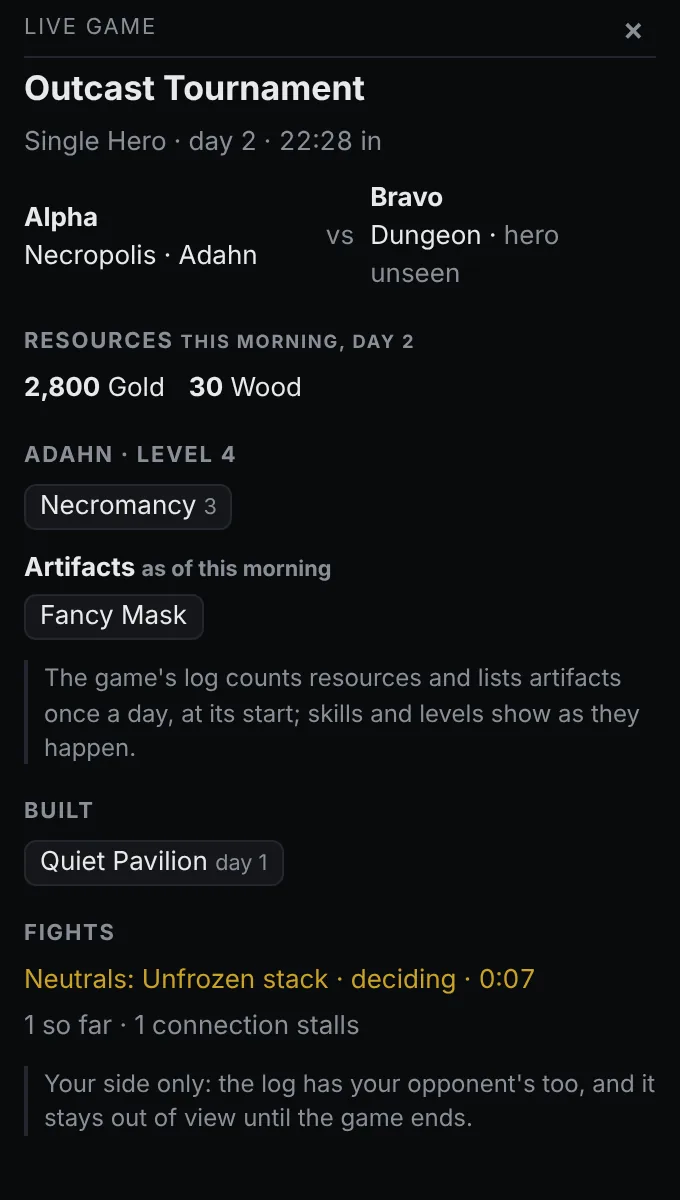
Press Alt+G for the live panel, a small window beside the game with your side of it: the day and the game clock, your resources, what you have built, your hero's level, skills and artifacts, and the fight you are in with its clock. Resources and artifacts are as of that morning, because the log counts them once a day; artifacts you pick up during the day are listed under them. Level-ups and skills appear the moment they happen.
The panel only ever shows your own side. The log holds your opponent's side too (that is how the game keeps both players in step), and the companion keeps it out of view until the game is over.
After the game: your game history
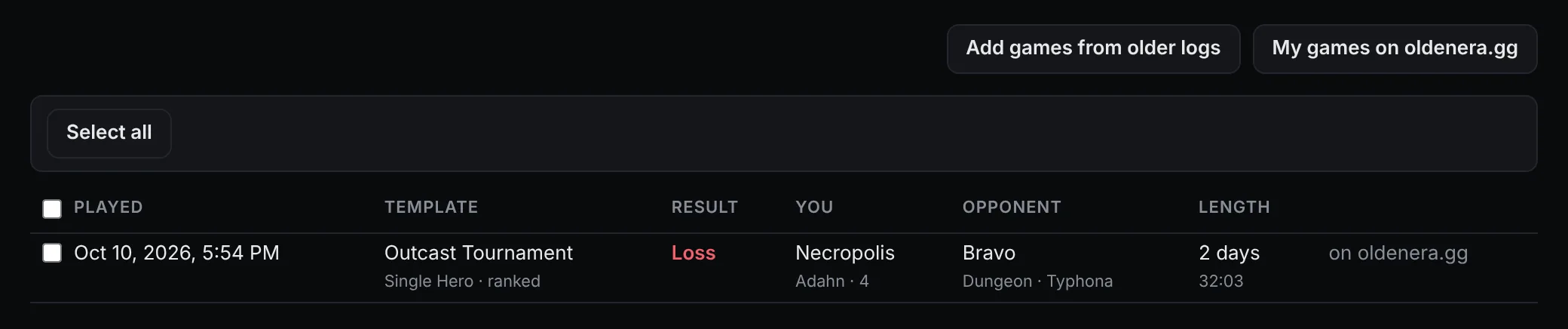
Every online game you finish goes into the companion's game history: open it from the tray menu (Game history…) or the settings. Games against the AI are kept as well, and they never leave your computer. Add games from older logs reads the logs the game kept from earlier launches, so your history can start before the day you installed the companion.
Tick games to upload or delete several at once, or use Select all. Once your history holds games against the AI too, Online games and Games vs AI select each kind.
What a game report shows
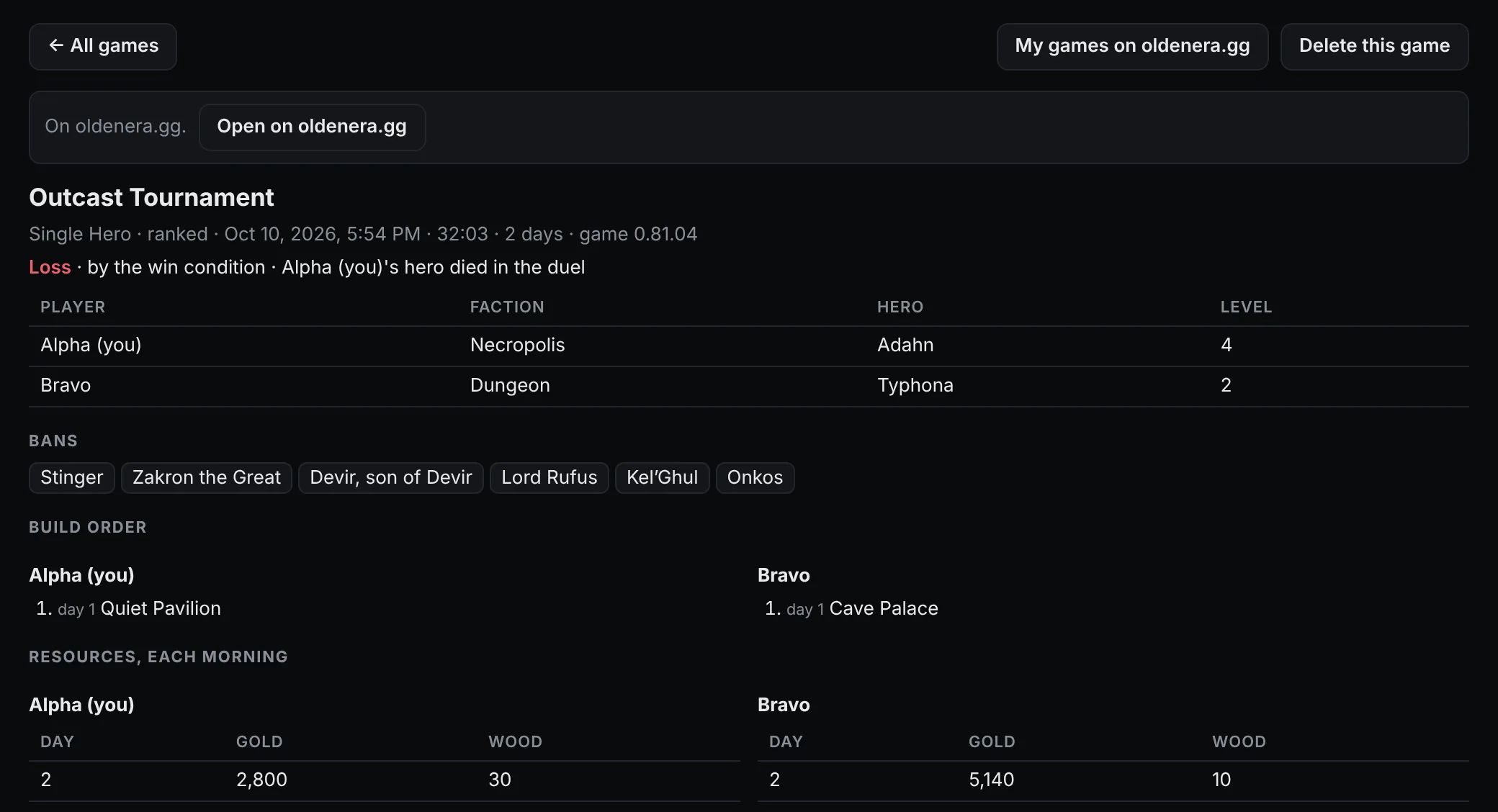
Open a game and you get both sides:
- The result: who won and how, for example "by the win condition", with each player's faction, hero and level, and the bans.
- Build order: every building, and the day it went up.
- Resources, each morning: gold and every other resource, for both players.
- Level-ups: each level, with the skill or perk picked at it.
- Heroes at the end: their level, skills and artifacts.
- Fights: neutral stacks with their power, battle sites and duels; whether each was played or auto-resolved, how long it took, a stack that joined you, and a hero's death.
- Purchases: the creatures each side hired, with counts and where.
- Chests and boxes: what each side opened and what was inside.

The log records a neutral stack's power, not its size, so the report works out about how many creatures the stack held for each form it could have been. For purchases, the log names the creature and the count but not the buyer: the companion credits you with the ones your own game sent a hire command for, and your opponent with the rest.
Laws and armies, from the autosaves
The log never names a law or lists an army. The autosaves the game writes, one at the start of every day, do. So once a game has ended (never while it is on), the companion finds that game's saves and adds both sides' laws, in the order they were taken, and each hero's level, Attack, Defense, Spell Power, Knowledge and army, morning by morning.
The game writes autosaves for games against the AI and for lobby games. A ranked game keeps them in memory and writes none, so ranked reports have no laws or armies; the report says so. Look for its autosaves again retries if the saves turn up later.
How to use a report to get better
A report is most useful read against your opponent's half of it. Here is a real one, a four-day ranked Single Hero game on Exodus that the site's own account lost with Necropolis against Hive, as it appears on OldenEra.gg (the opponent's name is hidden here):
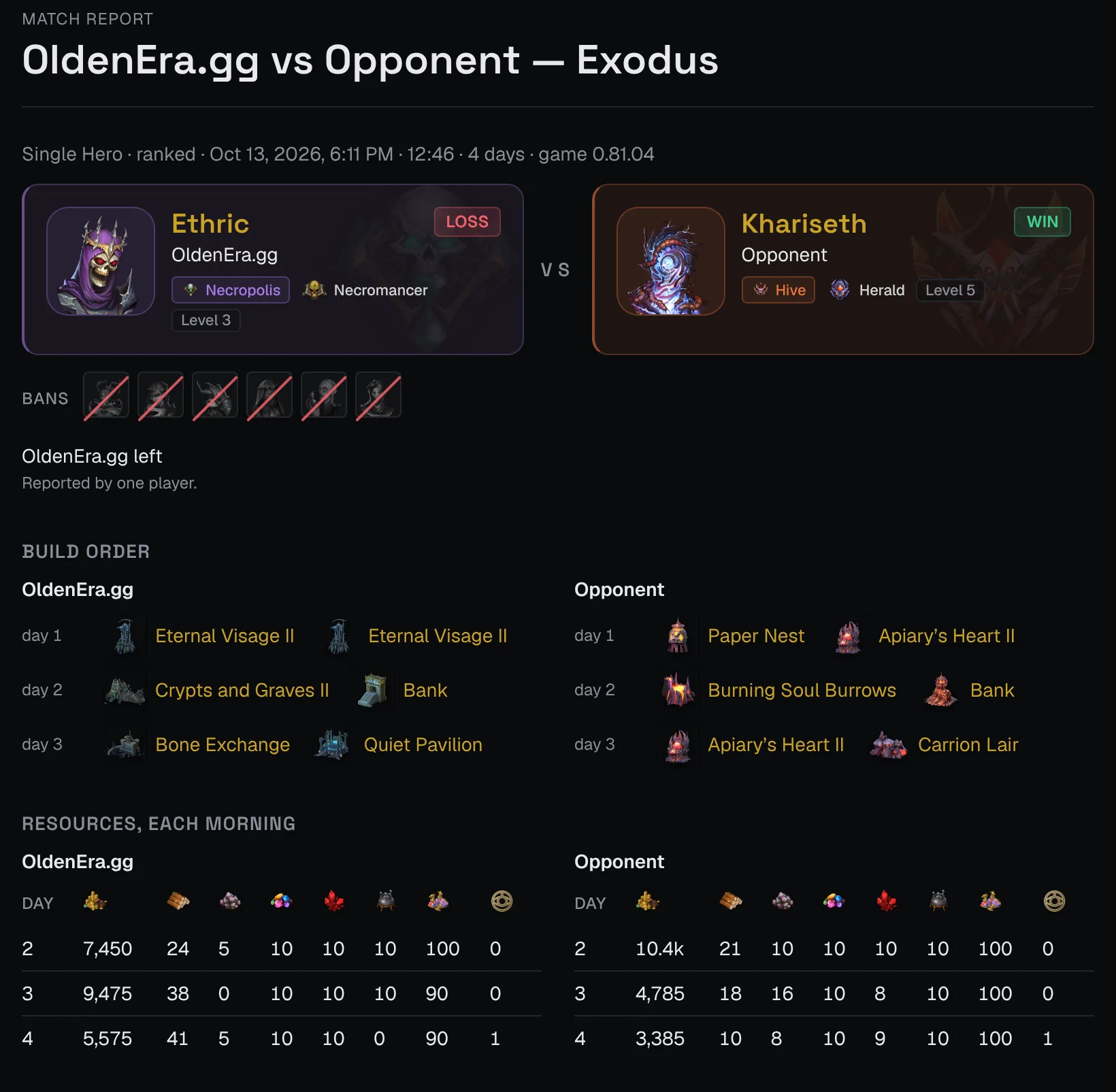
- Compare the build orders day by day. Both sides put up two buildings a day and both had a Bank by day 2; the difference is in what each built first, and the report lays the two orders side by side.
- Watch the gold line. Hive went from 10.4k gold on day 2 to 3,385 on day 4, while Necropolis still held 5,575. Gold still in the bank on day 4 is gold that is not fighting for you yet.
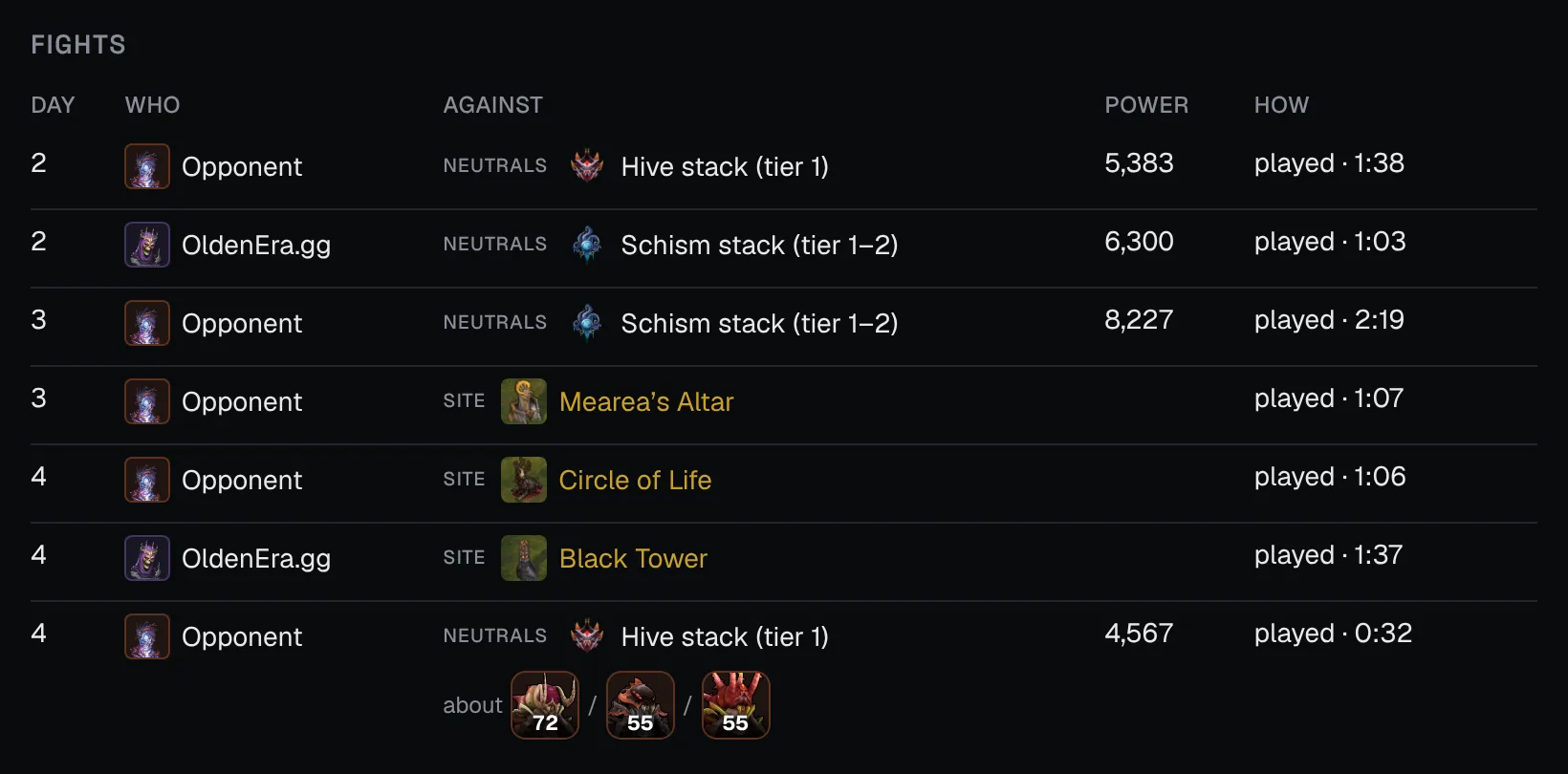
- Find the fights that made the difference. Hive's hero cleared three neutral stacks and two battle sites by day 4 and reached level 5; Necropolis fought one stack and the Black Tower and stayed at level 3.
- Check the level-up picks. Each level shows the skill or perk taken, so you can see the order a stronger player builds their hero in.
Share your games on OldenEra.gg (optional)
Uploading is a second switch, Upload finished games to oldenera.gg, and it is off until you turn it on. The first time, a window shows your latest game exactly as it would be sent, before anything is.
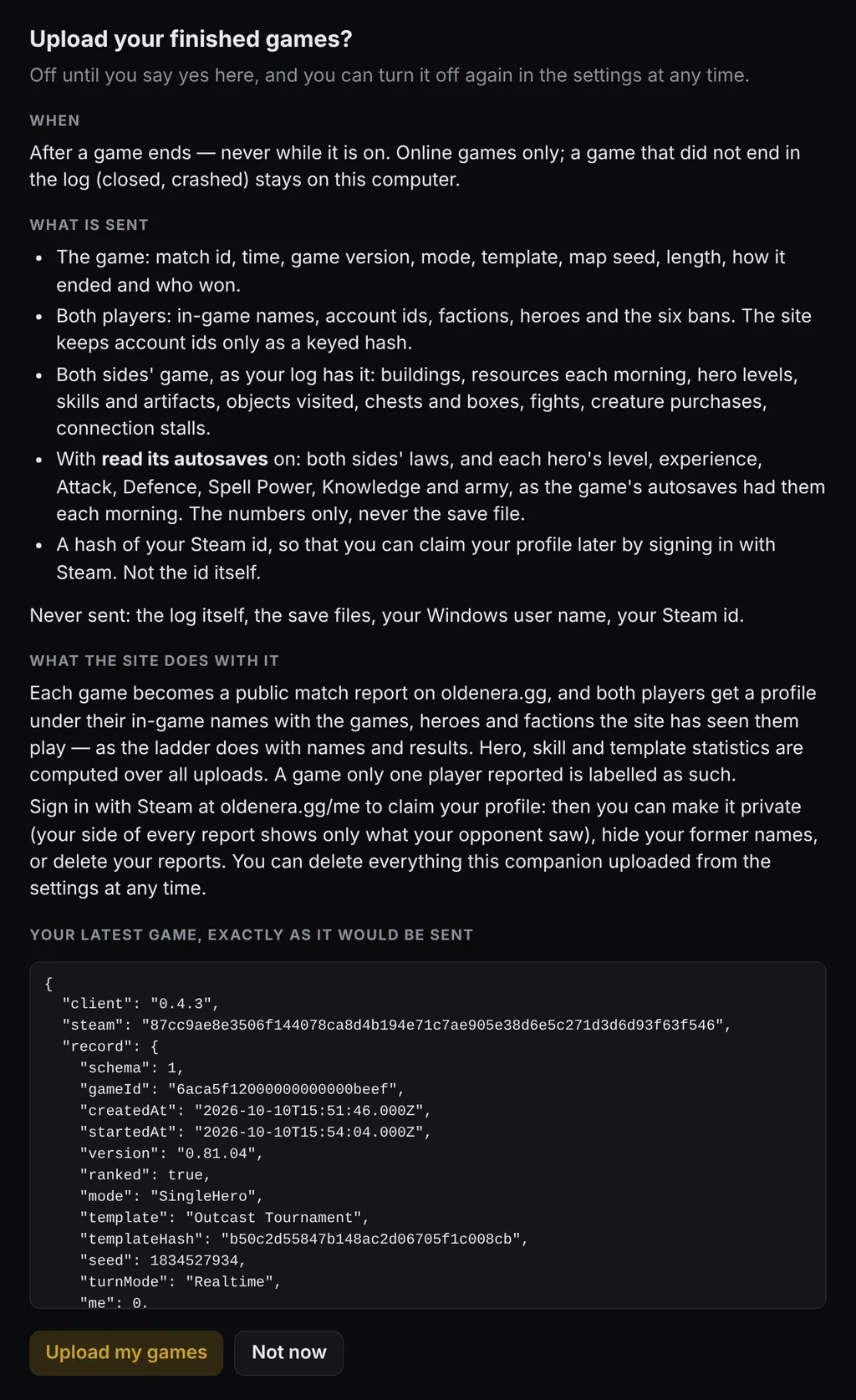
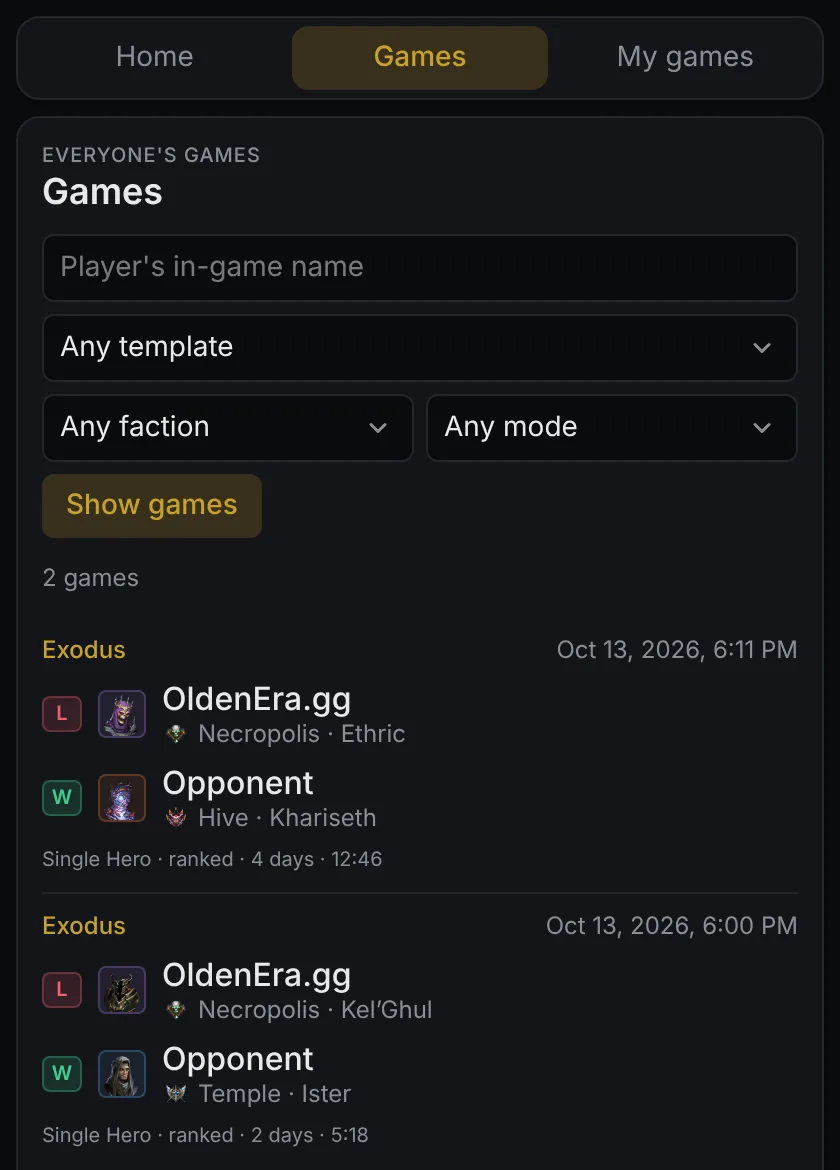
Once it is on, each online game you finish is sent after it ends, never while it is on. A game that cannot go, because the site is out of reach, waits and is retried by itself; the history says why the last try failed, and Send now tries at once. On the site, every uploaded game becomes a public match report like the one above, and feeds:
- the games browser, and the Games tab of the companion's home page, filterable by player, template, faction and mode;
- both players' profiles;
- hero, skill and template statistics computed from every upload.
What is sent, and what never is
A record is the game as your log saw it: both players' in-game names and account ids, factions, heroes, bans, buildings, resources, skills, artifacts, objects visited, chests and boxes, fights and purchases, plus laws, armies and hero stats where autosaves were found. It carries a hash of your Steam id, so you can claim your profile later. It never contains the log or a save file, your Windows user name, or your Steam id itself. Games against the AI, and games the log saw no end of, stay on your computer.
Your games and your profile
- My games on oldenera.gg, in the game history or the settings, opens your uploaded games on the site, signed in with a one-time link.
- Sign in with Steam on your games page to claim your profile. You can then make it private, hide your former names, or delete the reports made from your account. Claiming needs one game uploaded by the companion on that Steam account.
- Delete my uploaded games…, in the settings, deletes everything your companion sent.
- Played against a companion user and want out? The removal form erases your name and your side of their uploads.
FAQ
Does it record games against the AI?
Yes, with the same report, on your computer. They are never uploaded.
Why does my ranked game have no laws or armies?
The game keeps a ranked game's autosaves in memory and writes none to disk, so there is nothing for the companion to read.
Can I see games I played before installing the companion?
Yes, as far back as the game kept its logs: click Add games from older logs in the game history.
Can other people see my reports?
Only the games you upload. Uploaded games are public match reports; games you keep on your computer are seen by no one else.
Does uploading slow the game down?
No. Games are sent only after they end, never while one is on.