
7 Ways the OldenEra Companion Helps You Play Olden Era Better
By OldenEra.gg Staff · Updated
The OldenEra Companion is a free Windows overlay for Heroes of Might & Magic: Olden Era. It reads whatever you point at in the game and shows what the game leaves out. Put like that it sounds abstract, so here are the seven moments it was built for, what it shows in each, and who gets the most out of it.
What the game shows, and what the companion adds
| Moment | The game shows | The companion adds |
|---|---|---|
| A battle site | Its name and the kinds of reward | Every roll's guard stacks, power and exact reward, and the battlefield |
| A neutral stack | The creature and a rough size | Its stats and abilities, in the game's own words |
| The lobby | Your opponent's name | Their rank, rating, record, factions and templates |
| The draft | The faction cards | Each faction's win rate on the template and against the others, and your opponent's record with and against each |
| During the game | Your own screens | A live panel: day, resources, buildings, hero, the fight you are in |
| After the game | Who won | A report of both sides: build orders, resources, level-ups, fights, purchases |
1. Learn the creatures without leaving the game
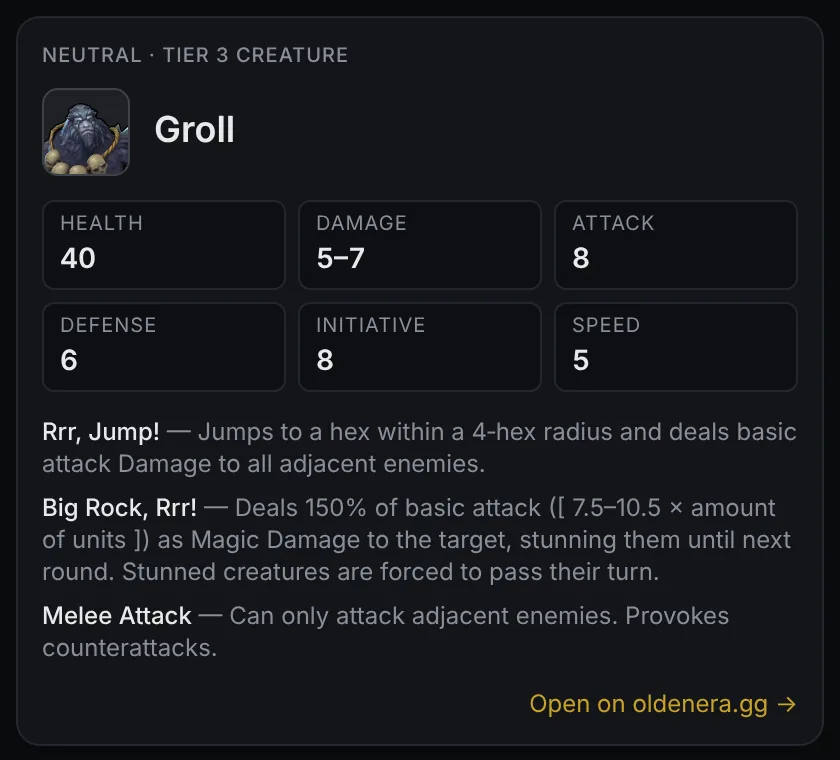
Six factions, seven creature lines each with alternative upgrades, and a crowd of neutrals: nobody remembers every ability. Point at a creature's dialog or tooltip and its card opens with health, damage, Attack, Defense, initiative, speed and every ability, without an alt-tab or a wiki search in the middle of your turn.
Most useful for: new players, Heroes veterans meeting Olden Era's own factions for the first time, and anyone facing a neutral they have never fought. The faction guide is the next step once the names start to stick.
2. Decide which battle sites are worth clearing
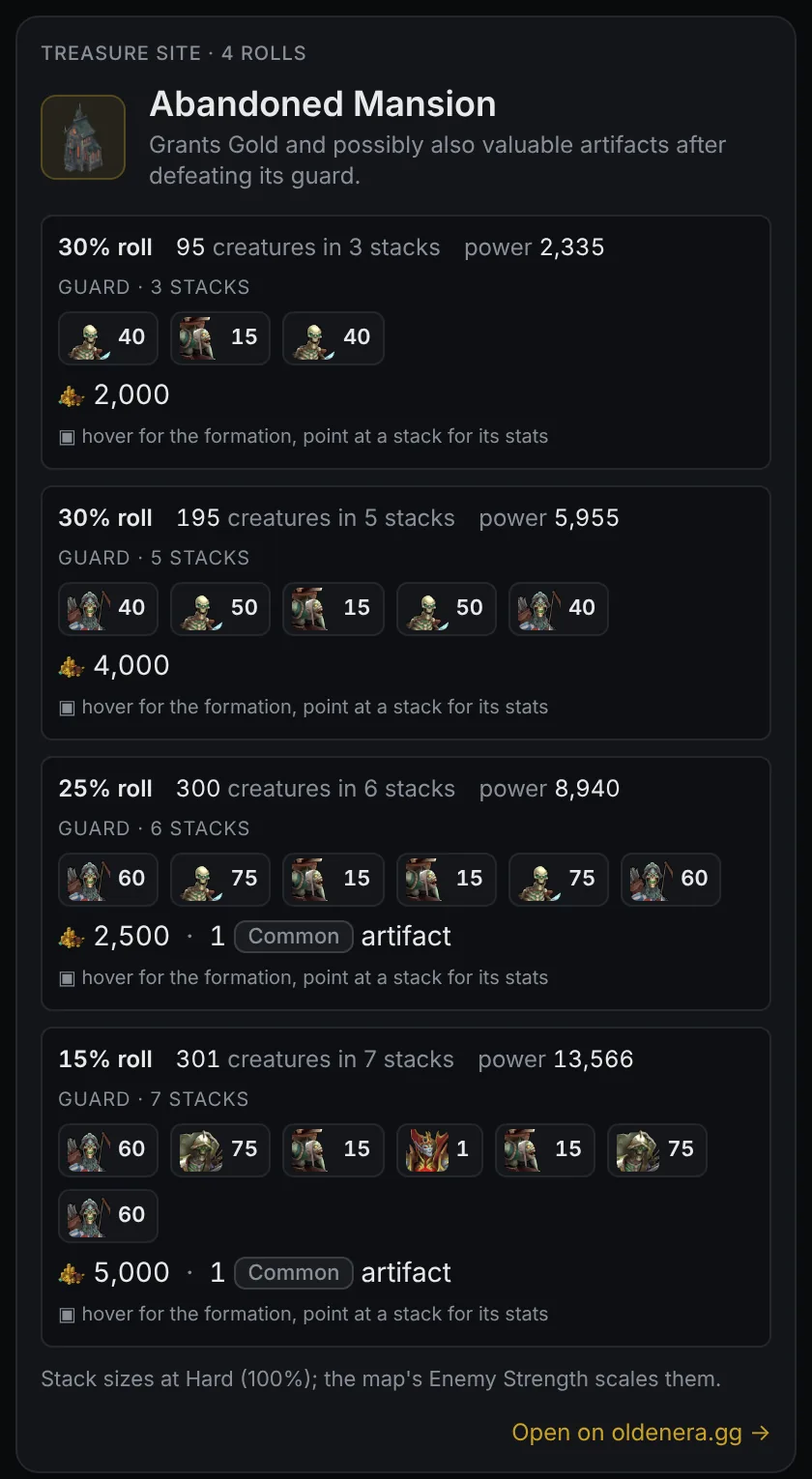
The game's tooltip tells you a battle site holds "some Gold, or resources". The companion's card tells you every roll the site can have: the guard's stacks and their power, the exact reward, and, on hover, the battlefield with every stack's position. You know the best and the worst case before your hero moves a step.
Most useful for: planning your first week, when a lost army costs you the game. Battle sites: guards and rewards shows how to read a card.
3. Keep your own game in one place while you play
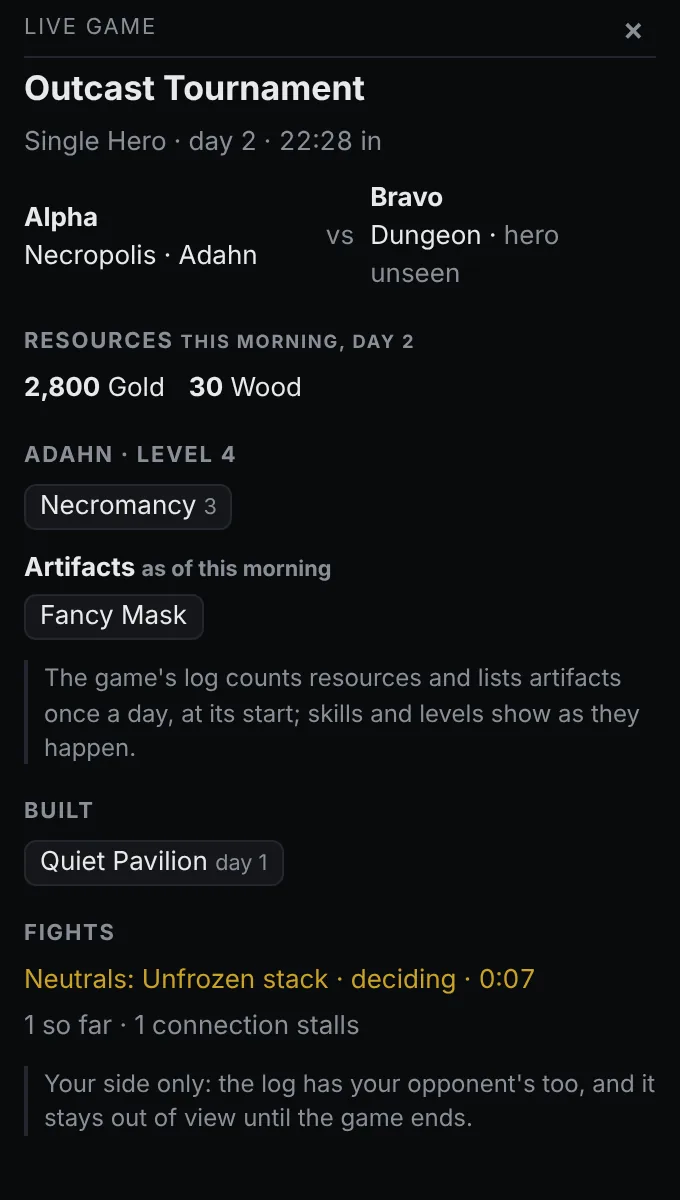
With the game's log switched on, Alt+G opens the live panel, a small window that keeps your side of the game in view: the day and the game clock, the morning's resources, what you have built, your hero's level, skills and artifacts, and the fight you are in with its clock. It shows your own side only, never your opponent's, while the game is on.
Most useful for: long games, where your build and your gold are easy to lose track of between fights. Match history and game reports covers the panel and the report you get when the game ends.
4. Ban and pick with numbers, not a hunch
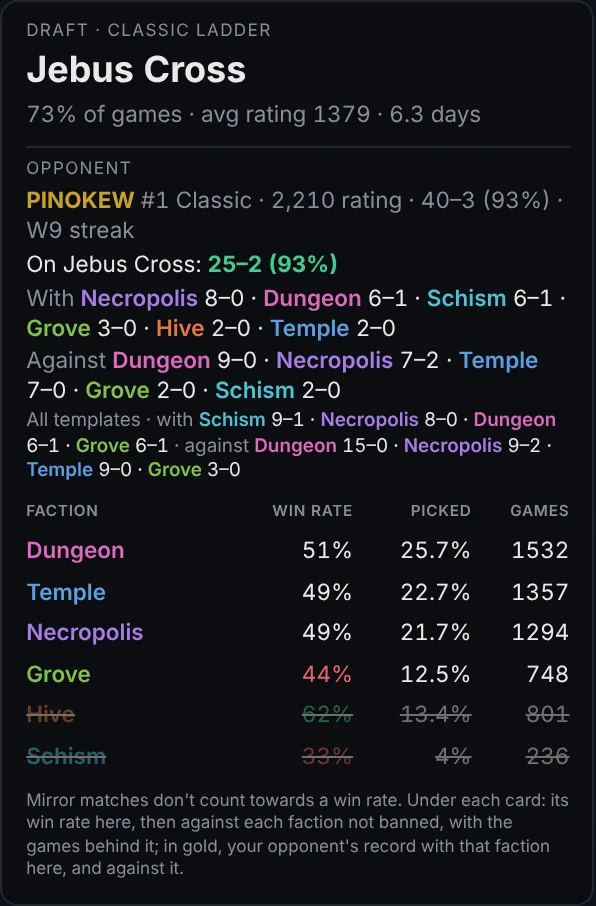
A ranked draft moves fast, and all the game gives you is six faction cards. With the game's log switched on, the companion draws each faction's win rate on your template, its win rate against every faction still in the draft and your opponent's record with and against it straight onto the draft screen, and keeps up with the bans as they happen.
Most useful for: ranked Classic and Single Hero players. The draft overlay guide has a worked example.
5. Scout your opponent before day one
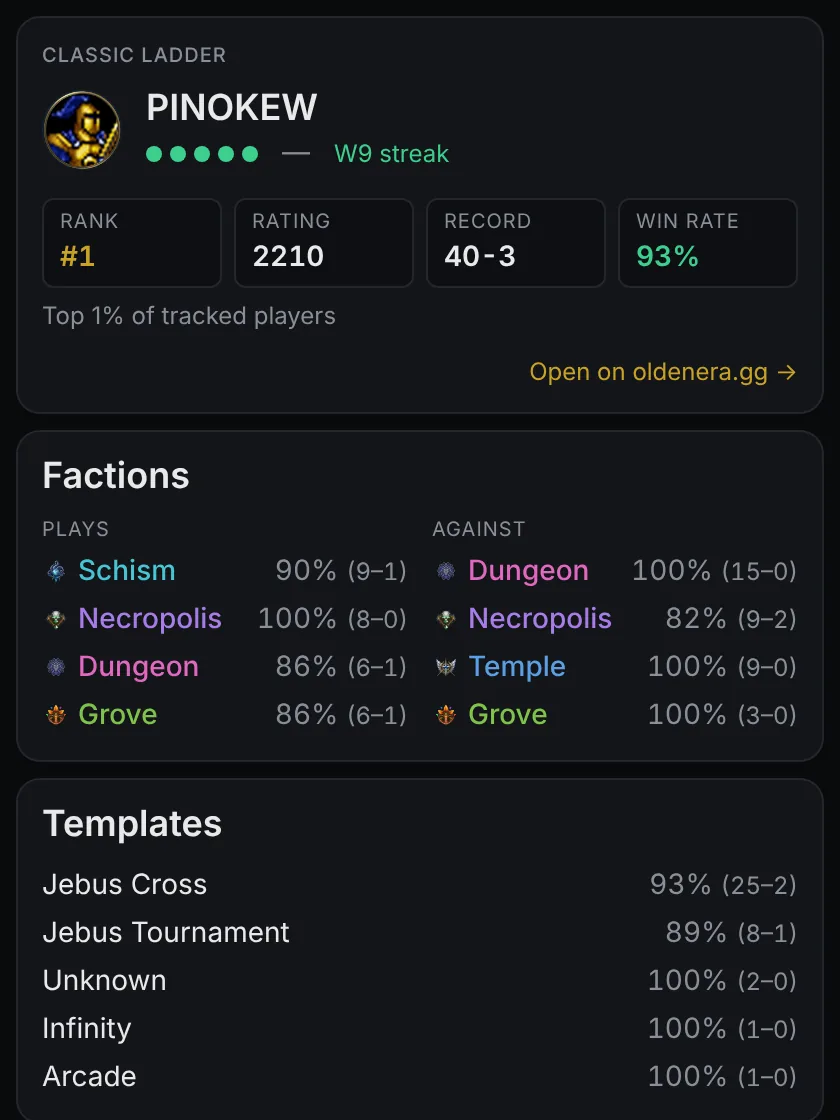
When the game finds you a match, the opponent's card opens: their ladder rank and rating, their record and recent form, the factions they play and win with, and the templates they are strongest on. Knowing that the player across the table is 15–0 against Dungeon changes what you pick.
Most useful for: anyone climbing the ladder. The card covers the top 200 of each mode, the players the ladder tracks.
6. Find out why you lost
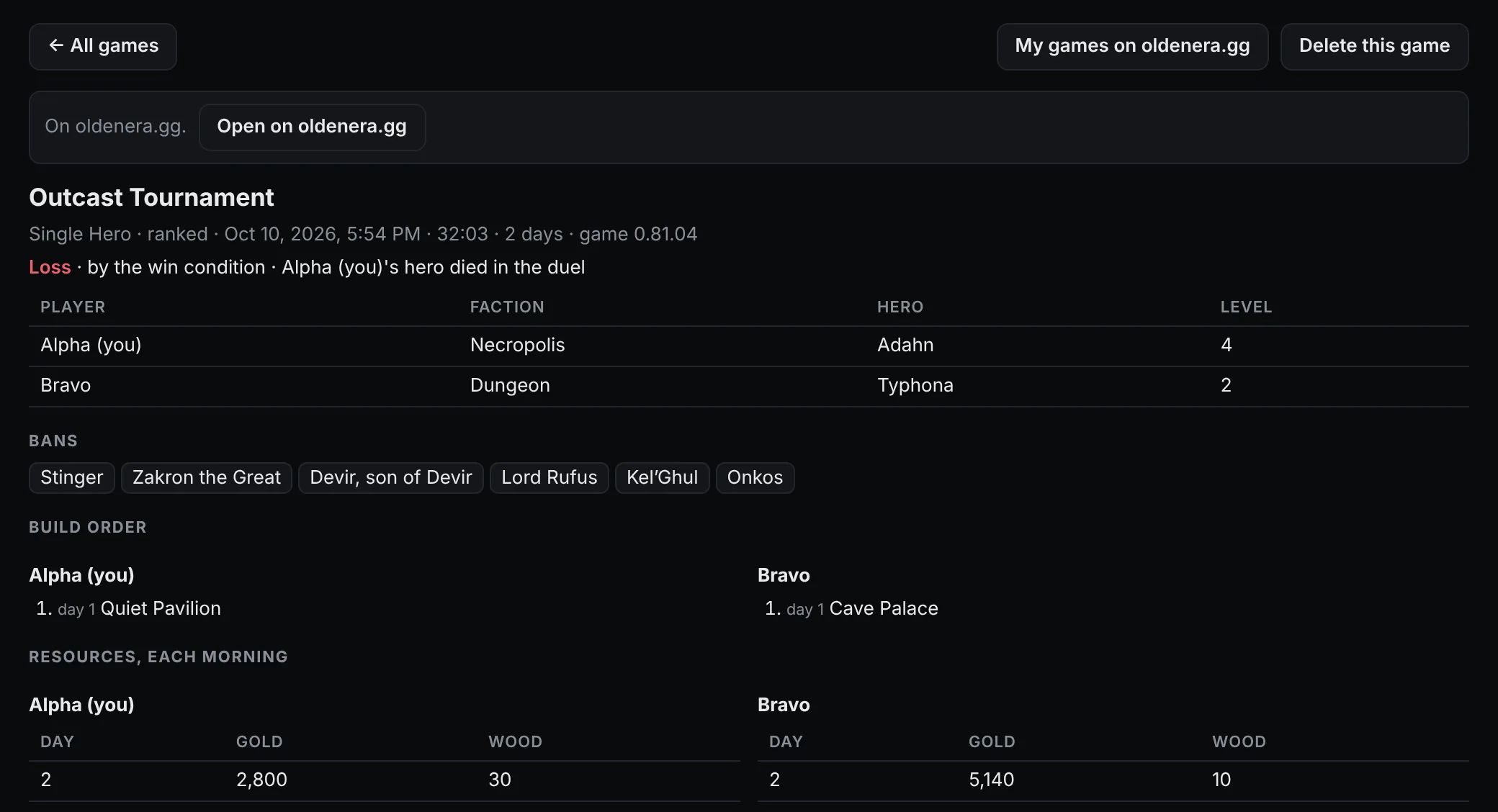
With the game's log switched on, the companion saves a report of both sides after every game, from the game's own log: the build orders, the resources each morning, each level-up with the skill picked, every fight and every purchase. Put your half next to the winner's and the turning point is usually plain: a build that came a day late, gold that sat in the bank, a fight that cost the main army.
Most useful for: players who want to improve between games rather than during them. Match history and game reports explains every section.
7. Keep a record of your games, and share it
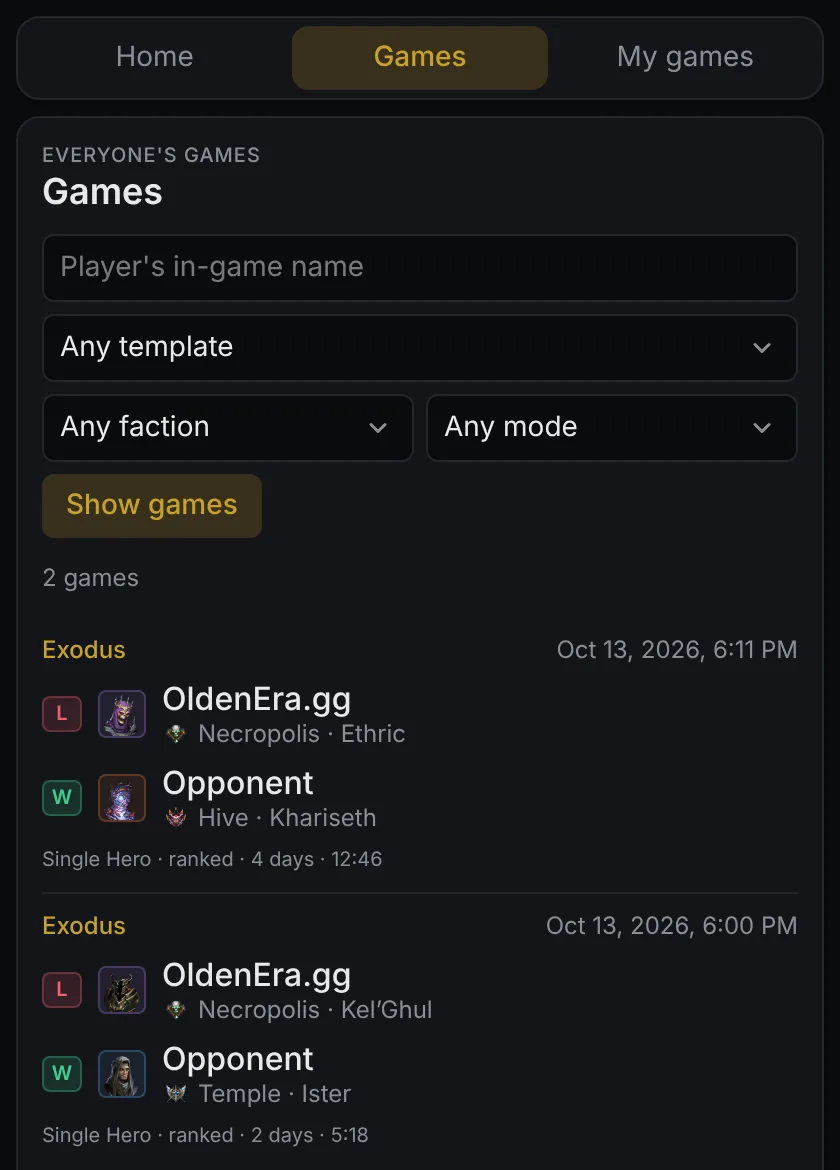
Your history stays on your computer, games against the AI included. If you switch on uploading, each finished online game also becomes a public match report on OldenEra.gg: a link you can send a friend or a coach, and a profile that collects your games. Signing in with Steam lets you claim that profile, make it private or delete your reports.
Most useful for: players who review games with friends, coaches and streamers, and anyone who wants their games to count towards the site's hero and template statistics.
Who might not need it
- You only play in exclusive fullscreen. The current version is a window on top of the game, so it needs borderless or windowed mode.
- You are not on Windows. The desktop companion is Windows only. The web companion shows the same cards in any browser, typed rather than read off the screen, so a phone beside the keyboard works fine.
- You would rather discover everything yourself. Turn hover mode off in the tray menu and leave the game's log off, and the companion shows nothing until you ask, with a hotkey or the search page.
Get started
The companion is free, and setting it up takes a few minutes. Download it from oldenera.gg/companion, then follow the installation and setup guide to your first card.